This is Phase 3 of the hybrid AI inference platform. In the previous post, I connected a Mac Mini running Ollama to a GCP VM through Tailscale. That works for direct connectivity, but it is a single tunnel with no redundancy and no dynamic routing. This phase adds the enterprise-grade networking layer: HA VPN with BGP.
What I tried first (and why it failed)
My original plan was to build HA VPN directly between GCP and my Mac Mini, using Tailscale as the underlay network. The Mac Mini’s Tailscale IP is 100.80.121.94, and I configured it as the peer endpoint for the VPN tunnels in Terraform.
GCP rejected it:
Error: peer_ip may not be in RFC1918 IP range: 100.80.121.94
The 100.64.0.0/10 range is Carrier-Grade NAT space. GCP requires public IPs for VPN tunnel endpoints because the IPsec negotiation happens over the public internet. My Mac Mini, sitting behind my landlord’s NAT router with a Tailscale overlay IP, does not have a public IP I control.
This is a real constraint that engineers face in home lab and branch office environments. In an enterprise, the on-premises side would have a static public IP assigned to a dedicated router or firewall appliance. Without that, traditional HA VPN cannot terminate on-prem.
Rather than abandon the concept, I pivoted: simulate the on-prem environment with a second VPC in GCP. This lets me demonstrate the full HA VPN + BGP configuration, failover behaviour, and Terraform automation while being honest about the home lab limitation.
The Mac Mini remains connected to the infrastructure VPC via Tailscale for actual AI inference. The HA VPN simulation proves the networking skills independently.
The architecture
Two VPCs in the same GCP project, connected by HA VPN with BGP:
Infrastructure VPC (infra-vpc): Subnet 10.10.0.0/24. This is the cloud side, housing the orchestrator VM. Cloud Router ASN 64514.
On-Prem VPC (onprem-vpc): Subnet 192.168.1.0/24. This simulates an on-premises data centre. Cloud Router ASN 65001.
Each side has an HA VPN gateway, and two tunnels connect them (one per gateway interface). BGP sessions run over each tunnel, advertising subnet routes dynamically.
Why HA VPN and not Classic VPN
GCP offers two VPN products. Classic VPN uses a single tunnel with static routing. HA VPN uses two tunnels with BGP dynamic routing and provides a 99.99% availability SLA (compared to 99.9% for Classic).
The difference matters in production. A single tunnel is a single point of failure. With HA VPN, both tunnels carry traffic simultaneously using ECMP (Equal-Cost Multi-Path routing). If one tunnel fails, BGP withdraws the route through it and all traffic shifts to the surviving tunnel automatically. No manual intervention, no downtime.
BGP: what it actually does here
BGP is how the two Cloud Routers exchange routing information. Without BGP, I would need to manually configure static routes telling each VPC how to reach the other. If a tunnel went down, those static routes would still point traffic into a dead tunnel.
With BGP, each router advertises its own subnet:
- The infra router (ASN 64514) advertises
10.10.0.0/24 - The onprem router (ASN 65001) advertises
192.168.1.0/24
Each router learns the other’s routes dynamically. When a tunnel fails, the BGP session over that tunnel drops, and the router withdraws the route. Traffic shifts to the remaining tunnel within seconds.
The BGP link-local addresses use the 169.254.x.x/30 range, which is standard for point-to-point VPN BGP sessions:
- Tunnel 0:
169.254.0.1/30(infra) peers with169.254.0.2/30(onprem) - Tunnel 1:
169.254.1.1/30(infra) peers with169.254.1.2/30(onprem)
Terraforming the VPN
The entire configuration is defined in the network Terraform module. Key resources:
HA VPN Gateways on each side. These are managed GCP resources that get allocated public IPs automatically:
resource "google_compute_ha_vpn_gateway" "infra_vpn_gateway" {
  name    = "infra-vpn-gateway"
  project = var.project_id
  region  = var.region
  network = google_compute_network.infra_vpc.id
}
VPN Tunnels connect the gateways. Four tunnels total (two per side). They use IKEv2 with a pre-shared secret:
resource "google_compute_vpn_tunnel" "infra_tunnel_0" {
  name                  = "infra-tunnel-0"
  vpn_gateway           = google_compute_ha_vpn_gateway.infra_vpn_gateway.id
  vpn_gateway_interface = 0
  peer_gcp_gateway      = google_compute_ha_vpn_gateway.onprem_vpn_gateway.id
  shared_secret         = var.vpn_shared_secret
  router                = google_compute_router.infra_router.id
  ike_version           = 2
}
BGP Sessions are configured as router interfaces and peers:
resource "google_compute_router_interface" "infra_interface_0" {
  name       = "infra-bgp-interface-0"
  router     = google_compute_router.infra_router.name
  ip_range   = "169.254.0.1/30"
  vpn_tunnel = google_compute_vpn_tunnel.infra_tunnel_0.name
}

resource "google_compute_router_peer" "infra_peer_0" {
  name            = "infra-bgp-peer-0"
  router          = google_compute_router.infra_router.name
  peer_ip_address = "169.254.0.2"
  peer_asn        = 65001
  interface       = google_compute_router_interface.infra_interface_0.name
}
The shared secret is marked as sensitive = true in Terraform, so it never appears in plan output or state logs. The terraform.tfvars file containing it is excluded from version control via .gitignore.
Verifying BGP
After terraform apply, I checked the Cloud Router status:
gcloud compute routers get-status infra-router \
  --region=us-central1 \
  --format="table(result.bgpPeerStatus[].name,
                   result.bgpPeerStatus[].status,
                   result.bgpPeerStatus[].numLearnedRoutes)"
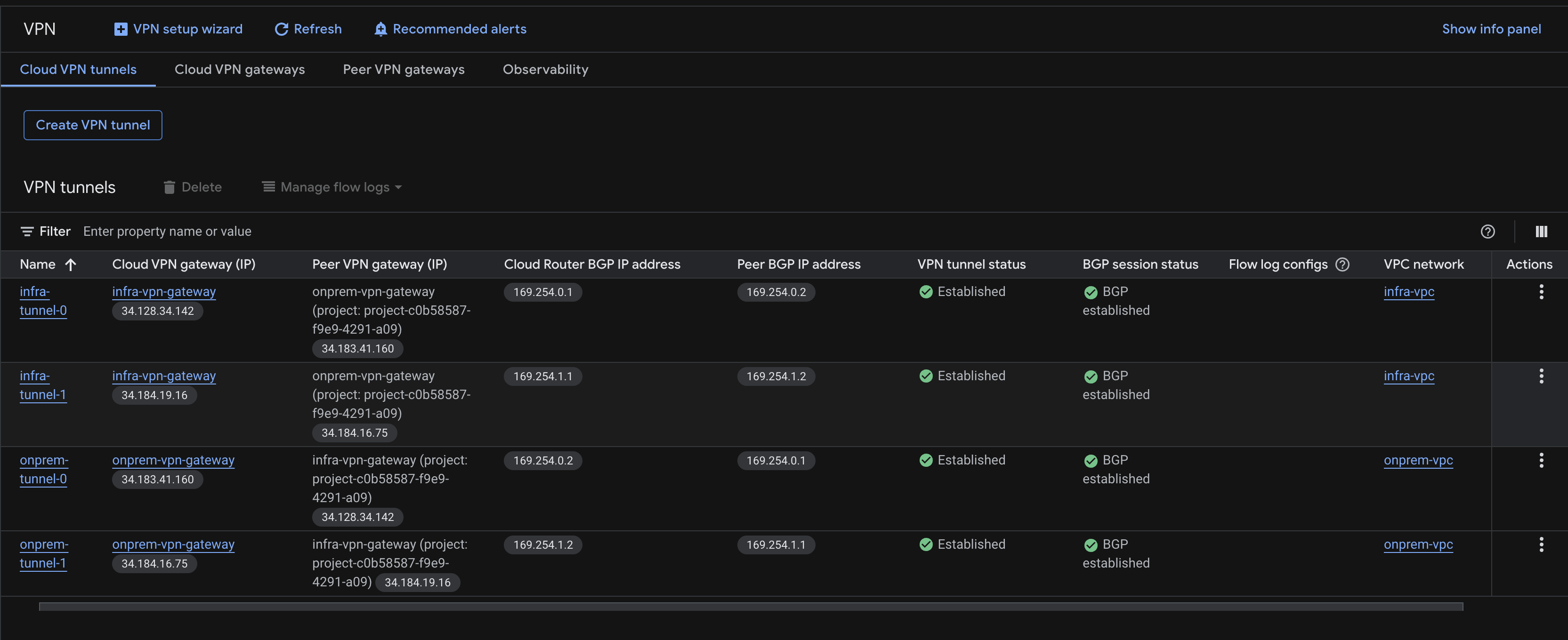
Both peers showed UP with one learned route each. The infra router learned 192.168.1.0/24 from the onprem side, and the onprem router learned 10.10.0.0/24 from the infra side.
In the GCP Console, all four tunnels showed green status with BGP established:
Testing failover
The real test of HA VPN is what happens when a tunnel dies. I deleted one tunnel pair to simulate a failure:
gcloud compute vpn-tunnels delete infra-tunnel-0 --region=us-central1 --quiet
gcloud compute vpn-tunnels delete onprem-tunnel-0 --region=us-central1 --quiet
Immediately after, I checked BGP status:
gcloud compute routers get-status infra-router \
  --region=us-central1 \
  --format="table(result.bgpPeerStatus[].name,
                   result.bgpPeerStatus[].status,
                   result.bgpPeerStatus[].numLearnedRoutes)"
The result:
infra-bgp-peer-0: DOWNinfra-bgp-peer-1: UP, 1 learned route

BGP did exactly what it should. The route to 192.168.1.0/24 through tunnel 0 was withdrawn. The route through tunnel 1 remained active. Traffic would continue flowing through the surviving tunnel with no manual intervention.
Recovery with Terraform
To restore the infrastructure, I ran:
terraform apply
Terraform detected that two tunnels and their associated BGP interfaces were missing, and recreated them. Within seconds, both BGP peers returned to UP status. The full four-tunnel, dual-BGP-session configuration was restored automatically.
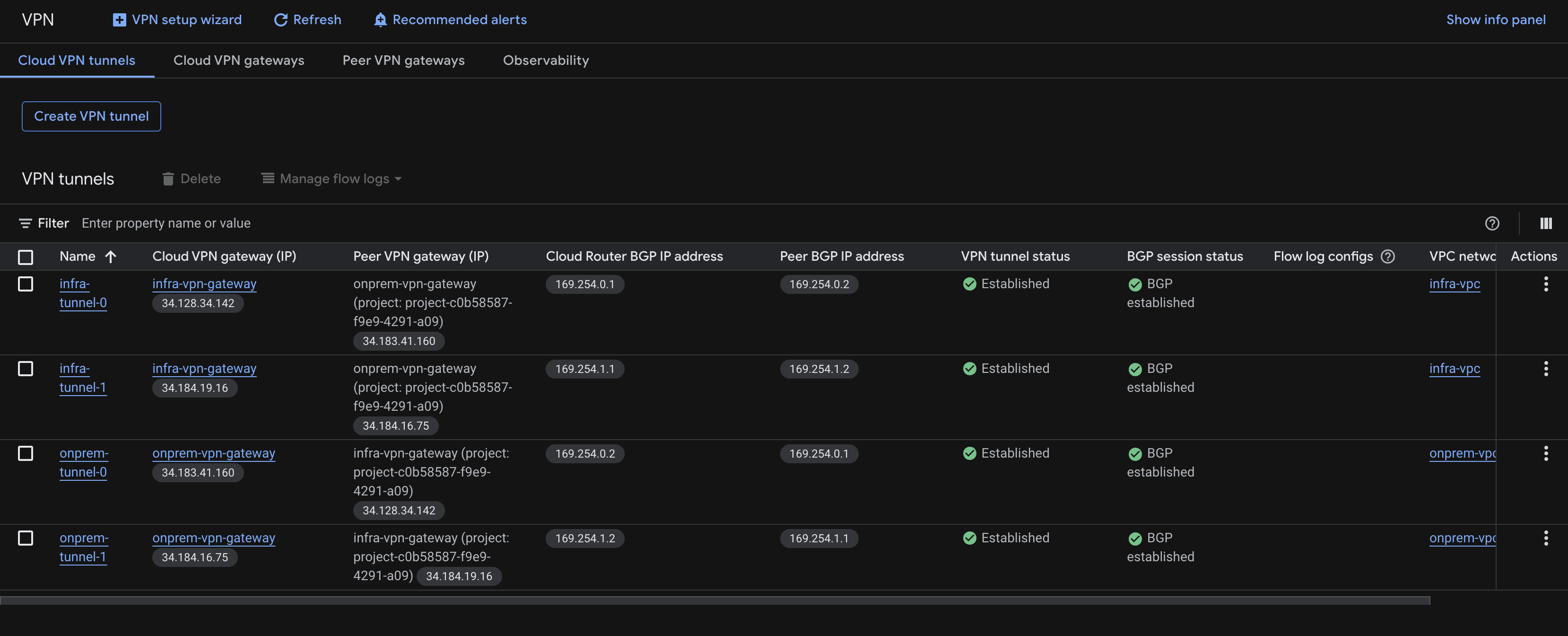
This demonstrates one of the most powerful aspects of infrastructure as code: the desired state is defined in Terraform, and any drift from that state can be corrected with a single command.
Security considerations
The VPN tunnel endpoints use public IPs (allocated by GCP), but these only accept IKE negotiation traffic on UDP ports 500 and 4500. They do not respond to pings, SSH, or any other protocol. An attacker who discovered these IPs could not use them without the pre-shared key.
The pre-shared key itself is the weakest link in this authentication model. In a production environment, I would use certificate-based authentication instead. The key is stored in terraform.tfvars which is excluded from version control, and a future improvement would be to store it in GCP Secret Manager and reference it dynamically.
The VMs behind the VPN retain their existing security posture: no public IPs, IAP-only SSH access, least-privilege service accounts.
What I learned
The CGNAT limitation was a genuine surprise. I studied HA VPN extensively for the PCNE certification, but the exam scenarios always assume a public IP on the on-premises side. Hitting this constraint in practice taught me something the exam did not: the gap between textbook architecture and real-world deployment.
The failover test was the most satisfying part. Watching BGP withdraw a route and shift traffic to the surviving tunnel in seconds is the kind of thing you read about in documentation but do not fully appreciate until you see it happen.
And Terraform’s ability to reconcile drift (recreating deleted tunnels with a single apply) reinforces why infrastructure as code matters. Manual recovery from a tunnel failure would involve remembering exact configurations, recreating resources in the right order, and hoping nothing was missed. Terraform handles all of that from the state file.
What’s next
Phase 3 is complete. The hybrid platform now has enterprise-grade connectivity with redundancy and dynamic routing. Phase 4 builds the orchestration API: the application that receives inference requests and decides whether to route them to Ollama on the Mac Mini (via Tailscale) or to Vertex AI on GCP.